
| Google Web API for Processing by Tatsuya SAITO | ||||||||||||||||||||||||||||||||||||||||||||||||||||||||||||||||||||
| rev 02 | ||||||||||||||||||||||||||||||||||||||||||||||||||||||||||||||||||||
| Updates | ||||||||||||||||||||||||||||||||||||||||||||||||||||||||||||||||||||
| - 03/05/2005 : rev03 added some new functions | ||||||||||||||||||||||||||||||||||||||||||||||||||||||||||||||||||||
| - 28/04/2005 : rev02 changed the library structure | ||||||||||||||||||||||||||||||||||||||||||||||||||||||||||||||||||||
| - 14/04/2005 : rev01 launched | ||||||||||||||||||||||||||||||||||||||||||||||||||||||||||||||||||||
| Description | ||||||||||||||||||||||||||||||||||||||||||||||||||||||||||||||||||||
Google Web API developer's kit provides a programming interface to query web pages through Google from our own computer programs. This library is a processing wrapper for Google Web API. There are some limitations in terms of maximum numbers of query per a day. However, Google Web API has great potential to allow Processing users to create sketch pieces enriched by huge amount of data available through Google. |
||||||||||||||||||||||||||||||||||||||||||||||||||||||||||||||||||||
| Installation | ||||||||||||||||||||||||||||||||||||||||||||||||||||||||||||||||||||
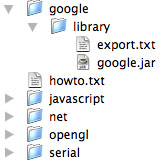
To use Google Web API library on Processing, take the following flow. 1. Installing the library package Download the package here: google_r03.zip After uncompressing the file, copy 'google/' folder into 'libraries/' folder which you can find under the processing folder. The folder/file structure should be as follows.
2. Restart processing You should be able to import the google library from sketch menu.
3. Google API Java library To use Google API on processing, you need to add googleapi.jar file to your sketch. Go to the download section on Google Web API website and download the Developer's Kit. Uncompress the package file and you will be able to find googleapi.jar in the extracted folder. Add this googleapi.jar into your sketch by clicking 'Add File...' in 'Sketch' menu.
4. Getting a license key Google API also requires a license key, which you can create in account registration section. Once you get the license key, it works as an authorization key specifically for you. Avoid losing it. As mentioned in the reference, you need to give this license key to Google class to activate API.
|
||||||||||||||||||||||||||||||||||||||||||||||||||||||||||||||||||||
| Reference | ||||||||||||||||||||||||||||||||||||||||||||||||||||||||||||||||||||
this library contains two classes that have the following methods and member variables and an event handler which should be located in your sketch.
|
||||||||||||||||||||||||||||||||||||||||||||||||||||||||||||||||||||
|
||||||||||||||||||||||||||||||||||||||||||||||||||||||||||||||||||||
| Sample | ||||||||||||||||||||||||||||||||||||||||||||||||||||||||||||||||||||
|
||||||||||||||||||||||||||||||||||||||||||||||||||||||||||||||||||||
// Google Web API String WORD = "Processing"; Google google; void setup(){
size(200, 200);
google = new Google(this, "REPLACE HERE WITH YOUR LICENSE KEY");
google.searchBy(WORD);
smooth();
}
float tick = 0.0; void draw(){
background(255); // draw a wheel
pushMatrix();
translate(width/2, height/2);
for(int i = 0 ; i < 10; i ++){
pushMatrix();
rotate(tick + i * 2*PI/10.);
translate(10, 0);
noStroke();
fill(sin(tick*2)*100+100);
rect(0, 0, 10, 2);
popMatrix();
}
popMatrix();
 if( google.isSearching() ){
   // rotate the wheel when querying
   tick += 0.01;
 } else {
   // draw a button if not querying
   noStroke();
   fill(230, 200, 200);
   beginShape(TRIANGLES);
   vertex(width/2 + 8, height/2);
   vertex(width/2 - 4, height/2-7);
   vertex(width/2 - 4, height/2+7);
   endShape();
 }
} void mousePressed(){
google.gotoNext();
}
void googleEvent(GoogleResult result){
   println("total: " + result.totalResultsCount());
   for(int i = 0; i < result.size(); i++){
      println(result.title(i) + " : "+ result.url(i) + "-" + result.summary(i));
   }
} |
||||||||||||||||||||||||||||||||||||||||||||||||||||||||||||||||||||
| Etc. | ||||||||||||||||||||||||||||||||||||||||||||||||||||||||||||||||||||
Bugs, opinions and complains? Reach me at tatsuyas@ucla.edu
|
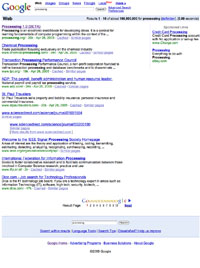
 searchBy()/relatedTo()
 gotoNext()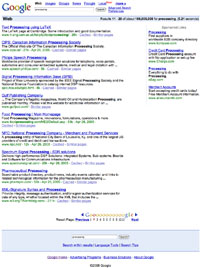

SAITO at UCLA.edu |