

Press the a key to see changes.
Download the sample file
Director: Keyboard Interaction and If statement
Use the text tool in the tool palette to create a word.
Highlight the word, use modify->font... Choose a font that can be used cross-platform such as arial, times, courier or verdana.
Edit the Score Script with Lingo
Double click the first box in the score script. See the diagram below.
A script window will appear. Type the following behavior in the score script.
on exitFrame
go to the frame
end
Add a behavior for the text:
Choose the text on you typed on the stage.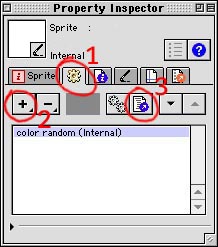
Open the Window->Inspectors->Property Inspector.
1) Go to the second tab for behaviors 
2) Click and hold on the top + button to add a new behavior. 
Name it
3) Click on the script icon to bring up the Script window 
Type the following in the new behavior script you just created.
on beginSprite
member(21).regPoint = point(160,17) --change the center of the font
end
on exitFrame
if the keypressed = "a" then
sprite(1).rotation = sprite(1).rotation + 5
end if
end
Funny Keyboard Example:
http://hotwired.lycos.com/animation/collection/laurence_arcadias/iloveyou